
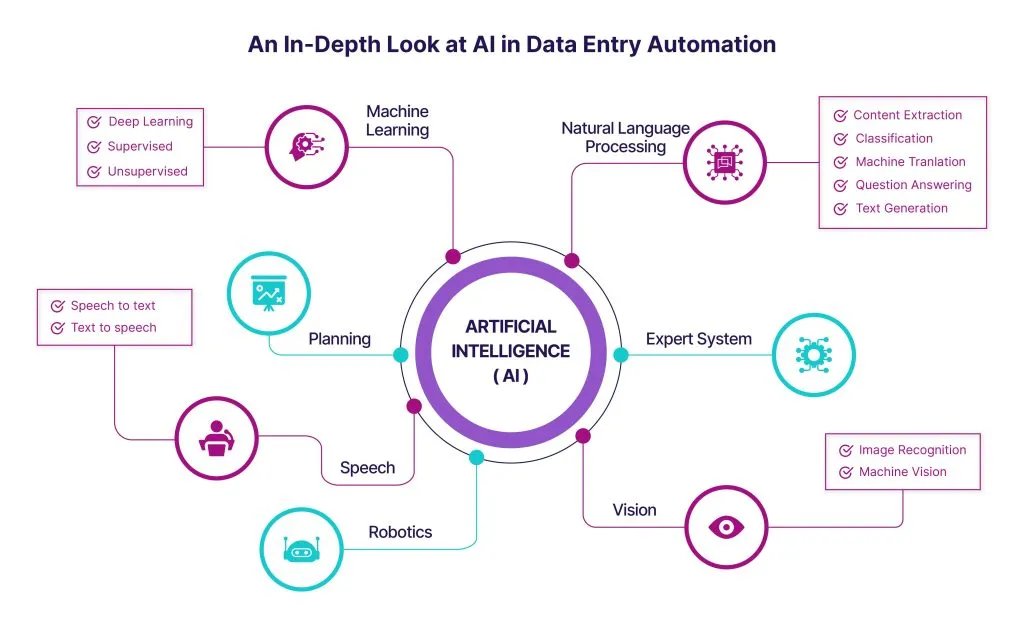
Businesses still spend a lot of time moving information between emails, spreadsheets, forms, invoices, and different software systems. Learning how to automate manual data entry process can reduce this repetitive workload and give employees more time for important responsibilities. AI can handle many routine steps, organize information, identify patterns, and move data between connected tools. The aim is not to remove people from every process. Instead, businesses can use automation to make everyday work quicker, more organized, and less dependent on repetitive typing.
Find Repetitive Work First
Before introducing AI, businesses should identify tasks that employees perform repeatedly throughout the day. Entering customer details, updating spreadsheets, processing invoices, sorting emails, and transferring information between systems are common examples. These activities often follow predictable steps, making them suitable for automation. Mapping the existing workflow can also reveal unnecessary approvals, duplicated information, or delays between departments. Once the process is clearly understood, it becomes easier to decide where automation can provide genuine value instead of adding another complicated technology layer.
Let AI Handle Everyday Workflows
AI can work with information that arrives in different formats, including emails, documents, online forms, and invoices. Instead of manually reading each item and transferring information into another system, an automated workflow can extract relevant details and organize them according to predefined requirements. Businesses can use this approach to automate routine business tasks with AI while still keeping employees involved when judgment is needed. This combination allows AI to handle repetitive processing while people review unusual information, make decisions, or deal with situations that require personal communication.
Connect Existing Business Software
Most businesses already use several digital tools for daily operations. These may include accounting platforms, customer relationship management software, email applications, project management systems, cloud storage, and spreadsheets. Automation becomes more useful when these systems can communicate with one another. For example, information submitted through an online form could be checked automatically and transferred into a customer database. An invoice received by email could also be routed to the appropriate workflow. Connecting existing tools can reduce unnecessary copying and create a smoother flow of information.
Start With Simple Processes
Companies do not need to automate their entire operation at once. Starting with one repetitive workflow can make the transition easier and provide useful lessons before larger changes are introduced. A business might begin by automating data collection, email sorting, document organization, or standard report preparation. After the workflow performs reliably, additional processes can be considered. This gradual approach also gives employees time to understand the system and identify situations where manual intervention is still necessary. Small improvements can eventually create significant savings across a growing organization.
Keep Human Review Where It Matters
AI can process information quickly, but not every situation should be handled automatically. Some documents may contain unusual information, incomplete details, or errors that require human attention. Businesses can create review points where employees approve information before it moves to another system. This is especially useful for financial records, customer information, contracts, and other important business data. Human oversight does not reduce the value of automation. Instead, it creates a balance where AI handles predictable work while employees remain responsible for decisions that require experience and judgment.
Improve Accuracy and Consistency
Repetitive manual entry can lead to small mistakes that become larger problems later. A missing number, incorrect customer detail, or duplicated record can affect several connected processes. Automated workflows can follow the same instructions each time, helping businesses maintain greater consistency. AI can also identify missing information or flag records that do not match expected patterns. However, businesses should still test automated processes carefully before relying on them. Regular checks can help identify errors, update outdated rules, and ensure the workflow continues to support current business requirements.
Measure the Results
Automation should solve a measurable business problem rather than simply introduce new technology. Before implementing a workflow, companies can record how much time employees currently spend completing it and how frequently errors occur. After automation is introduced, those figures can be compared with the new process. Businesses may also consider processing speed, employee workload, customer response times, and overall operating costs. These measurements show whether the automation is delivering useful results. They can also help teams decide which additional workflows are worth automating in the future.
Conclusion
AI can transform repetitive business work when it is introduced with a clear understanding of existing processes. Companies can begin with simple tasks, connect their current software, create suitable review points, and measure the results over time. Businesses exploring automation and digital transformation can also visit evolvextechnologies.com to learn more about technology solutions that may support their operational goals. With thoughtful planning, AI can reduce repetitive workloads, improve consistency, and allow employees to spend more time on work that requires communication, creativity, problem-solving, and informed decision-making.