
A cloud VM is basically a set of powerful CPUs, plenty of RAM, and fast storage, on cloud. It is good if you are running something locally for personal use. But if you want to host something on it that needs to be out there in the public like an application or a software, there has to be the right network configuration. It is basically a way how your VM communicates with users, other servers, and the internet.
That’s where cloud networking comes in.
There are three components that play an important role for this: public IP addresses, private IP addresses, and firewall rules. Each of these has a separate use case about which we will talk in detail further. Understanding how these three work together is essential for making your cloud VM accessible, functional, and secure.
Let’s break them down.
What is a public IP address?
A public IP address is an internet-routable address that allows devices outside your private cloud network to reach your VM, provided routing and security rules permit the connection.
For example, suppose you deploy a website on a cloud VM with the public IPv4 address 203.0.113.10.
A customer enters your website’s domain name into a browser. DNS resolves that domain to the public IP, and the browser connects to the server.
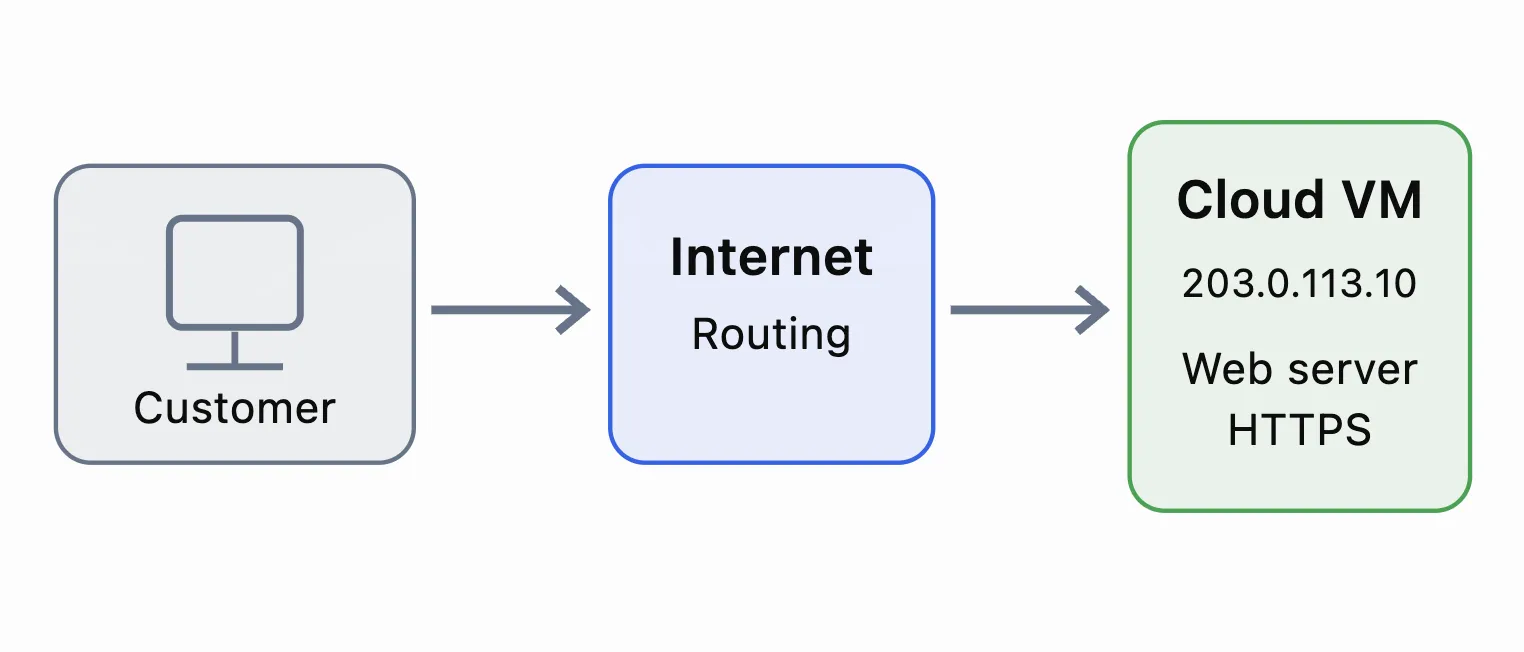
Public IP addresses are commonly used for websites, VPN gateways, application servers, and remote administration.
However, having a public IP does not mean every service should be publicly accessible.
A VM may need to serve HTTPS traffic to customers while restricting SSH or Remote Desktop access to trusted administrators.
Also, not every cloud VM requires a public IP. Private application servers and databases can operate without one.
What is a private IP address?
A private IP address is used for communication within private networks, such as a virtual private cloud (VPC) or virtual network.
Some of the common private IPv4 address are:
|
Private IP range |
CIDR notation |
|
10.0.0.0 – 10.255.255.255 |
10.0.0.0/8 |
|
172.16.0.0 – 172.31.255.255 |
172.16.0.0/12 |
|
192.168.0.0 – 192.168.255.255 |
192.168.0.0/16 |
These addresses are not routed directly across the public internet.
Imagine two VMs in the same cloud network:
-
Web server: 10.0.1.10
-
Database server: 10.0.1.20
The web server can connect to the database using its private IP, provided network routing and firewall policies allow the connection.
The database is usually not publicly accessible and thus private IP is used here.
This is especially useful for MySQL, PostgreSQL, Redis, internal APIs, and backend application services.
In simple words: A private IP allows cloud resources to communicate internally without requiring direct public internet exposure.
How public and private IP addresses work together
A cloud VM can have both a public IP and a private IP.
Let’s say an application is hosted across three servers.
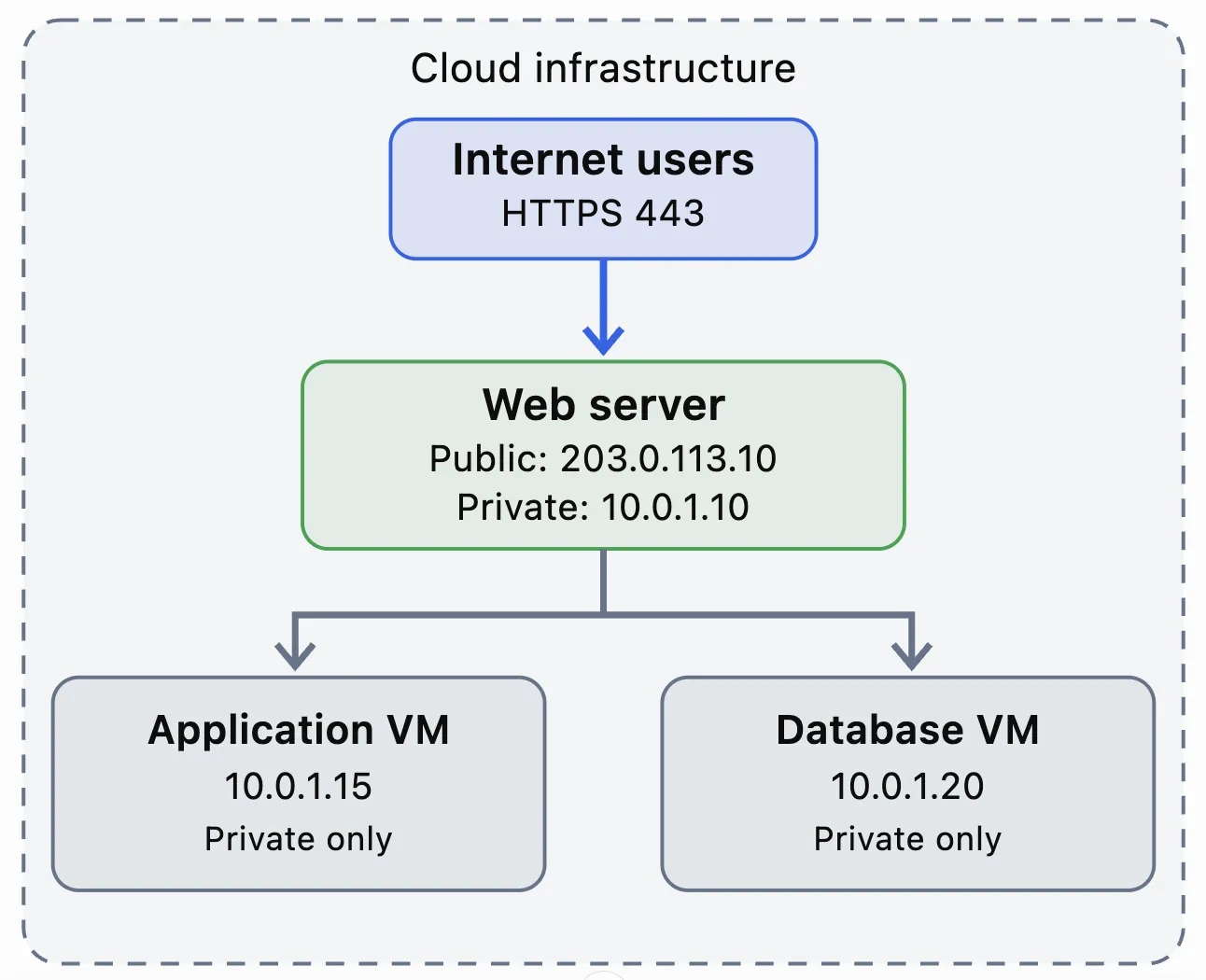
When a user opens the website, the request reaches the public-facing web server. The web server communicates with internal services over private IP addresses.
Depending on the cloud platform, the public IP may be configured directly on the VM’s network interface or mapped through Network Address Translation (NAT).
This architecture helps reduce the number of services exposed to the internet.
What are firewall rules?
A firewall controls network traffic entering or leaving a VM.
Firewall rules are security checkpoints. Every connection request is evaluated against rules that determine whether the traffic should be allowed or blocked.
A typical firewall rule includes:
-
Source IP: Where traffic originates.
-
Destination: Which server or address receives it.
-
Protocol: Usually TCP, UDP, or ICMP.
-
Port: Which network service is being accessed.
-
Action: Allow or deny.
For example, a Linux web server might require TCP port 443 for HTTPS and TCP port 22 for SSH administration.
Instead of allowing SSH access from the entire internet, you can restrict it to your office’s public IP.
Example firewall configuration
|
Service |
Port |
Allowed source |
Action |
|
HTTPS |
TCP 443 |
0.0.0.0/0 |
Allow |
|
HTTP |
TCP 80 |
0.0.0.0/0 |
Allow |
|
SSH |
TCP 22 |
198.51.100.25/32 |
Allow |
|
MySQL |
TCP 3306 |
10.0.1.15/32 |
Allow |
|
Other inbound traffic |
All |
All |
Deny |
The addresses shown are documentation examples.
Notice that SSH is restricted to one administrator IP, while MySQL accepts connections only from a private application server.
This follows the principle of least privilege: permit only the network access that an application actually needs.
Inbound vs outbound firewall rules
Firewall policies can control traffic in two directions.
-
Inbound rules control connections coming into the VM.
For example, customers accessing a website on TCP port 443 generate inbound traffic.
-
Outbound rules control connections initiated by the VM.
For example, when a server downloads operating system updates, it initiates an outbound connection to a software repository.
Some cloud firewalls automatically permit response traffic for established connections. Others require explicit rules in both directions.
It is important to know this distinction when troubleshooting connectivity problems.
Cloud firewall vs operating system firewall
A cloud VM has more than one firewall layer.
The cloud platform might provide network-level security groups or virtual firewall policies. The operating system also runs its own firewall, such as UFW, firewalld, nftables, or Windows Defender Firewall.
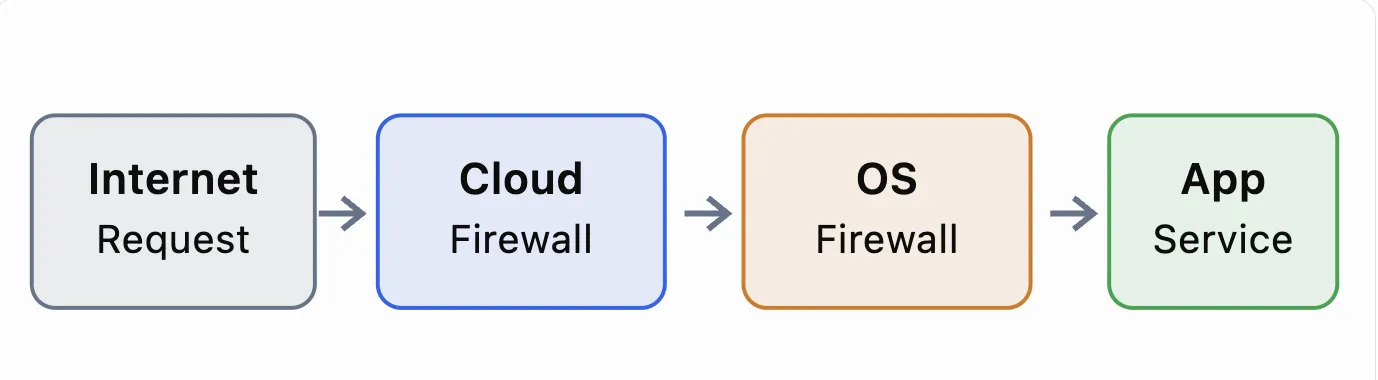
Every connection needs to pass multiple firewall layers before reaching the application.
Suppose you allow TCP port 443 in your cloud firewall but block it inside the VM’s operating system.
The website may still be unreachable.
Likewise, allowing a port in Windows Firewall will not help if the cloud-level firewall blocks it.
For a successful connection, routing must work, all relevant firewall layers must permit traffic, and the application must be listening on the correct interface and port.
Exposing database and management ports is risky
Let’s say a Windows cloud VM running SQL Server and Remote Desktop.
Common ports include:
|
Service |
Default port |
|
Remote Desktop (RDP) |
TCP 3389 |
|
Microsoft SQL Server |
TCP 1433 |
|
SSH |
TCP 22 |
|
MySQL |
TCP 3306 |
|
PostgreSQL |
TCP 5432 |
Opening these ports to 0.0.0.0/0 allows connection attempts from any IPv4 address, assuming other network controls permit them.
That increases exposure to password attacks, vulnerability scanning, and exploitation attempts.
A safer approach is to restrict administrative access to trusted IP addresses or use a VPN, bastion host, or private management network.
Database servers should generally accept connections only from authorized application servers and administrators.
How to troubleshoot cloud VM connectivity
Suppose your VM has a public IP, but you cannot access its website.
Check the following in order:
-
IP and routing: Verify the VM has the expected IP configuration, and that the cloud network has the correct route or public-IP mapping.
-
Cloud firewall: Confirm inbound TCP 443 is permitted from the required source.
-
OS firewall: Verify the guest operating system allows the connection.
-
Listening service: Check whether nginx, Apache, IIS, or the relevant application is running and listening on the intended port.
-
External connectivity: Test the connection from another machine.
On Linux, check listening TCP ports using:
</> Bash
|
ss -tulpen |
To inspect UFW status:
</> Bash
|
sudo ufw status verbose |
On Windows, you can test a remote service with PowerShell:
</> Bash
|
Test-NetConnection 203.0.113.10 -Port 443 |
A failed connection does not always indicate a firewall problem. Incorrect routing, application configuration, DNS, or a stopped service can produce similar symptoms.
Best practices for securing a cloud VM
Here are some best practices that will keep your cloud VM secure.
-
Use public IPs only where internet accessibility is necessary. Keep databases and internal services on private networks whenever possible.
-
Apply restrictive firewall policies, avoid exposing management ports globally, and review rules whenever applications or administrators change.
-
For production workloads, use monitoring, firewall logging, regular operating system updates, and secure remote access mechanisms.
-
Remember that IPv6 needs attention too. Restricting 0.0.0.0/0 does not automatically restrict IPv6 traffic, where ::/0 represents all IPv6 addresses.
-
Finally, document which services are exposed, why access is required, and who is authorized to connect.
Conclusion
Public IPs, private IPs, and firewall rules serve different but connected purposes.
A public IP makes a cloud resource reachable through the internet when routing and security policies allow it. A private IP enables communication within internal networks. Firewall rules determine which connections are permitted or denied.
Together, these components form the foundation of secure cloud VM networking.
The objective is not to block all traffic. It is to make the right services accessible to the right systems while keeping unnecessary access restricted.
For cloud administrators and businesses, understanding these fundamentals makes it easier to deploy applications, troubleshoot connectivity, and protect production infrastructure.